RequestSongs.co Roku App
Show your live request queue on the biggest screen in the room. Singer names, song titles, and tips update in real time so everyone knows what is coming next.

Show your live request queue on the biggest screen in the room. Singer names, song titles, and tips update in real time so everyone knows what is coming next.
The TV is already the focal point in most venues. With our Roku app, your queue becomes part of the show. It reduces interruptions, speeds up rotations, and makes tipping and special requests more visible.
The on-screen list updates the instant a request arrives. Everyone sees who is up now and who is next.
Names and titles are large and legible from across the room. No more crowding the booth to ask where they are in line.
Optional tip highlights and paid priority requests motivate participation and keep the rotation moving smoothly.
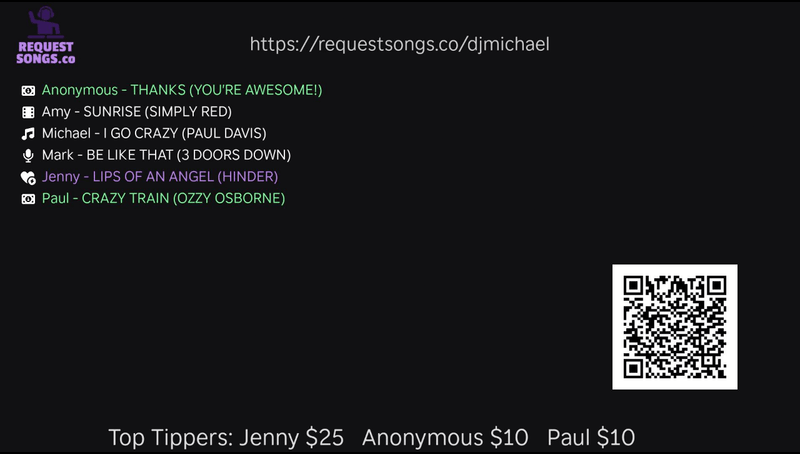
Add the RequestSongs.co app on your Roku TV or device.
Just enter your RequestSongs.co host name (e.g., djcool) and your live queue connects automatically. If your Roku has a screen saver enabled, be sure to disable it so the queue stays visible.
Requests, singers, and tips display in real time on the TV so everyone stays informed.
No. Any Roku TV or Roku device works. Install the app and link your host URL.
Yes. Tip highlights and priority markers can be shown so the audience understands the queue order.
It works alongside your RequestSongs.co workflow, including catalog uploads and queue management. Your queue feeds the Roku app automatically.
Download the RequestSongs.co Roku App, connect your host URL, and put your queue where everyone can see it. It takes only a few minutes to set up.
Get the Roku App